INDIA
 USA
What Is Hospital Pharmacy Inventory Management Software? An India Guide
Hospital pharmacy inventory management software is a digital system that tracks the medicines and supplies in a hospital pharmacy, from purchase to dispensing. It records batch numbers and expiry dates and shows live stock. It warns about low stock and near-expiry items, handles ward requests and links the medicines issued to the patient’s bill.
A hospital pharmacy never stops. Wards ask for injections. The operation theatre needs fluids and consumables. OPD patients wait for prescriptions. And the store keeper must know what is left on the shelf. When this runs on registers and memory, medicines expire unnoticed, urgent items run out and charges get missed. This guide explains what the software does, how it works, which features matter in India, and how to choose one.
What Is Hospital Pharmacy Inventory Management Software?
It is a central digital record of every medicine and supply that the pharmacy buys, stores and issues. Each item has a name, batch, expiry date, price and storage location. Every purchase, issue, return and write-off updates the record at once, so the stock on screen matches the stock on the shelf.
It is also called hospital pharmacy software, pharmacy stock management software or medicine inventory software. The names differ, but the job is the same: the right medicine, for the right patient, at the right time, without waste. For all hospital stores, read our guide to the hospital inventory management system.
How It Differs From Retail Pharmacy Software
Many software lists mix the two, so it helps to know the difference.
| Area | Retail pharmacy software | Hospital pharmacy software |
|---|---|---|
| Main job | Counter sales and billing | Stock control and issue across the hospital |
| Who asks for items | Walk-in customers | OPD, wards, OT, ICU, casualty and lab |
| Patient link | Usually none | Items are tied to the patient, bed and doctor |
| Stores | One shop | Central store, sub-stores and ward stock |
| Billing | Sale bill at the counter | Items join the patient’s final bill, including insurance cases |
| Audit | Basic | Detailed trail of who issued what, when and to whom |
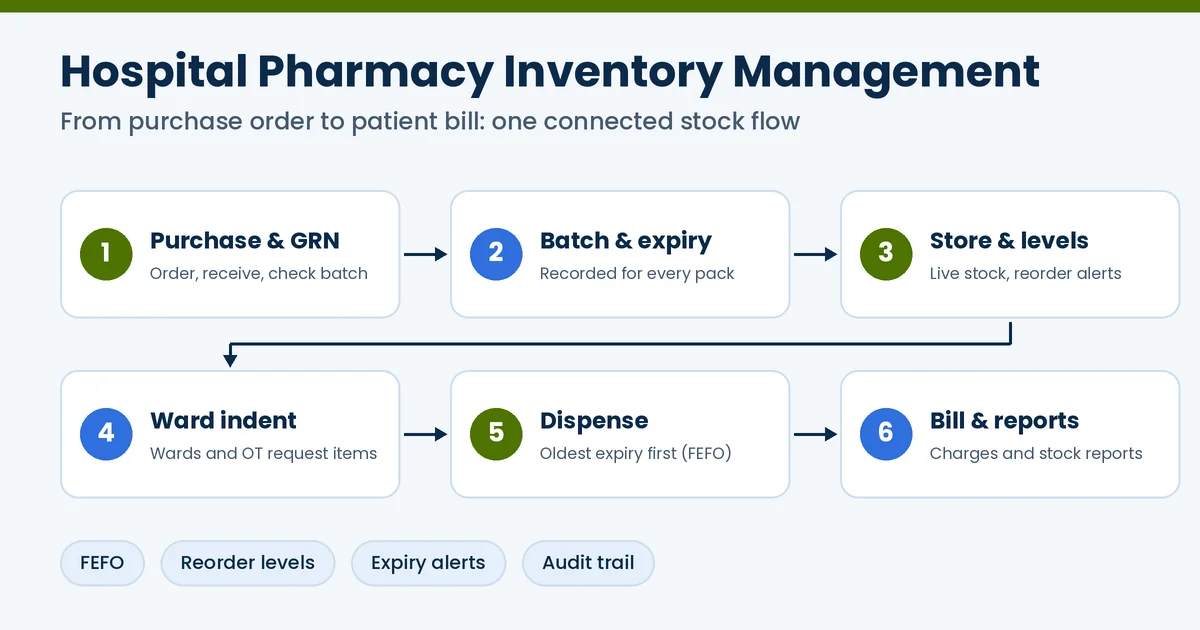
How It Works, Step by Step
- Purchase and receiving (GRN). The pharmacy raises a purchase order. When goods arrive, staff check them against the order and record a goods receipt note (GRN) with quantity, batch, expiry and price.
- Batch and expiry entry. Each batch is stored with its expiry date, so the system always knows what expires first.
- Storage and stock levels. Stock is kept by store and location. The software shows live quantities and warns when an item falls below its reorder level.
- Ward indents. Wards and the OT raise requests. The pharmacy checks stock and issues items, and the system records who received what.
- Dispensing. The pharmacist issues medicines against a prescription, taking the oldest-expiry batch first (FEFO).
- Billing and reports. Items issued reach the patient’s bill. Reports show stock value, expiry, consumption and shortages.
- Returns and write-offs. Returned, damaged or expired items are removed with a proper entry, so records stay clean.
Key Features to Look For
| Feature | Why it matters |
|---|---|
| Batch and expiry tracking, with FEFO | Issues the earliest-expiring batch first and cuts expiry losses |
| Reorder levels and low-stock alerts | Warns before an essential medicine runs out |
| Purchase orders, GRN and vendor records | Keeps buying and receiving in one place |
| Ward and OT indents | Requests, issues and stock changes are recorded together |
| Prescription dispensing | Links the prescription, the issue and the bill |
| Scheduled drug registers | Helps keep the records that the rules require |
| Multi-store support | Central store, sub-stores and ward stock under one view |
| Barcode or QR scanning | Faster, more accurate entry and issue |
| Pharmacy billing link | Items issued are posted to the patient bill |
| ABC and VED reports | Shows which items cost the most and which are most critical |
| Audit trail and access control | Every change is logged, and only the right staff can make it |
Why Indian Hospitals Need It: What the Studies Show
Medicines and supplies take a big share of hospital spending. A 2024 review of Indian studies, listed in the WHO South-East Asia index, notes something important. About one-third of a hospital’s yearly budget goes on materials and supplies, including medicines.
The spending is also uneven. One study looked at a secondary-level hospital linked to AIIMS. About 10 per cent of the drugs made up around 70 per cent of drug spending. About 70 per cent of the drugs made up only about 10 per cent. See the Journal of Young Pharmacists. Reports such as ABC analysis show a pharmacist which few items need the closest watch.
A 2025 study in a North Indian cancer hospital found that ABC-XYZ analysis improved drug availability and reduced wastage. Read the Indian Journal of Pharmacology paper. Your results may differ, but the lesson is clear: you can only control what you can see.
Rules and Standards to Keep in Mind in India
This is general information, not legal advice. Check the current rules with your pharmacist, accountant and legal adviser.
- Drug laws. The Drugs and Cosmetics Act and Rules are enforced with the CDSCO and state drug authorities. A pharmacy that sells or dispenses medicines needs the right licence, so confirm the licence type and conditions for your hospital.
- Schedule H1 drugs. These include some antibiotics and anti-TB drugs. A Government reply in Parliament says they can be sold only on a valid prescription. Each supply must be written in a separate register. The register must show the prescriber’s name and address, the patient’s name, the drug and the quantity. It must be kept for three years and be open for inspection. The list of drugs can change, so always check the current schedule.
- GST. Different items can have different tax rates. The software should let you set tax for each item. See the GST portal.
- NABH. NABH expects safe storage, handling and documented processes for medicines.
- Data protection. When medicines are linked to patients, the Digital Personal Data Protection Act, 2023 applies to that data. Read about data security before you choose.
How the Software Can Help
These are possible benefits, not promises. Results depend on the software, your data and how well your team uses it.
Connecting the Pharmacy With the Rest of the Hospital
Pharmacy stock should not sit on its own island. When it connects to the rest of the hospital system, one entry does the work of many:
- IPD and wards. Medicines given to an inpatient are linked to the patient and the bed.
- Operation theatre. OT supplies are requested and used against a case.
- Pharmacy billing. Items reach the patient bill, including insurance cases, without re-typing.
- Records. Prescriptions and issues link to the electronic medical record.
Many hospitals choose pharmacy inventory as part of a full hospital management software, not as a separate app. See how the parts fit in our guide to hospital information systems. For stock control methods, read about inventory management for hospitals.
What Affects the Cost?
- The number of users, beds and stores
- The modules you need, such as ward indents and billing
- Barcode, QR or handheld devices
- Cloud or on-premise setup
- Moving old stock data and opening balances
- Training, support and updates
Ask for a written quote that shows what is included and what costs extra.
How to Choose the Right Software
- List your stores and users. Note the central store, sub-stores, wards and OT.
- Ask for a live demo. Use your own cases: receiving a batch, a ward indent, an expiry alert and a patient bill.
- Check FEFO and expiry handling. It should work on its own, not by hand.
- Check the pharmacy billing link. Items should reach the patient bill without re-typing.
- Look at the registers and reports. Scheduled drug records, ABC and VED, and expiry reports should be ready to use.
- Review security. Ask about access control, activity logs and backups.
- Plan the start. Ask how opening stock is entered and what training is given.
- Speak to a similar hospital. They can tell you how it works day to day.
Three mistakes to avoid: choosing on price alone, skipping the opening stock count, and not training night-shift staff. Start with the main pharmacy store, then add wards and sub-stores.
Frequently Asked Questions
What is hospital pharmacy inventory management software?
It is software that tracks the medicines and supplies in a hospital pharmacy, from purchase to dispensing. It records batch numbers and expiry dates and shows live stock. It warns about low stock and near-expiry items, handles ward requests (indents) and links the items issued to the patient’s bill.
How is it different from retail pharmacy software?
Retail pharmacy software mainly handles counter sales and billing. Hospital pharmacy software also handles ward and OT requests, inpatient medicine issue, multiple stores, links with patient records and billing, and stricter audit trails.
What is FEFO in a hospital pharmacy?
FEFO means First Expired, First Out. The system tells staff to issue the batch that expires first, even if it arrived later. This helps to reduce expired stock.
What is a ward indent?
A ward indent is a request from a ward, the operation theatre or another department to the pharmacy for medicines or supplies. The software records the request, the issue and the stock change in one place.
Can the software help with Schedule H1 records?
It can help you keep the separate register that the rules ask for, with prescriber, patient, drug and quantity details. But you must follow the current rules, so check them with your pharmacist and the drug control authority.
Do we need barcode scanners?
Not always. Many pharmacies start without them. Barcode or QR scanning can make entry and issue faster and cut typing mistakes. Ask whether the software supports it, in case you want it later.
Can small hospitals and nursing homes use it?
Yes. A small hospital can start with one pharmacy store, batch and expiry tracking and low-stock alerts, and add more stores, wards and reports as it grows.
How much does hospital pharmacy inventory software cost in India?
Prices vary. The main factors are the number of users, beds and stores, the modules you need, barcode devices, cloud or on-premise setup, data migration, training and support. Ask for a written quote that shows what is included and what costs extra.
Related reading: Hospital Inventory Management System: Full Guide · Best Hospital Management Software in India · Medical Invoicing Software in India · Smart Hospital Management System in India · Hospital Administration Software in India
Conclusion
Hospital pharmacy inventory management software is more than a stock register. It keeps medicines in date, in stock and linked to the patient who uses them. In Indian hospitals, medicines take a large share of the budget, and some records must be kept by law. So choose with care. Test with your own cases, and pick a system that connects with billing and the rest of the hospital.
Looking for Hospital Pharmacy Software in India? Consider iCAN Careflow
iCAN Careflow is a cloud-based hospital management system made for hospitals and clinics in India. It is designed to streamline and automate pharmacy work, and it connects with OPD, IPD, OT, ward, lab and billing, along with ABHA integration.
If you want pharmacy, wards and billing working from one system, iCAN Careflow is a good choice to shortlist. Ask for a demo of the pharmacy module, and check each point in this guide against it with your own cases before you decide.