INDIA
 USA
OPD Software for Clinic in India: What It Is, Key Features and How to Choose
OPD software for clinic in India is a simple digital tool that handles patient registration, appointments, queue tokens, prescriptions, billing and follow-up in one place. It replaces paper registers and memory, so the doctor spends more time with patients and the front desk spends less time searching, repeating and correcting.
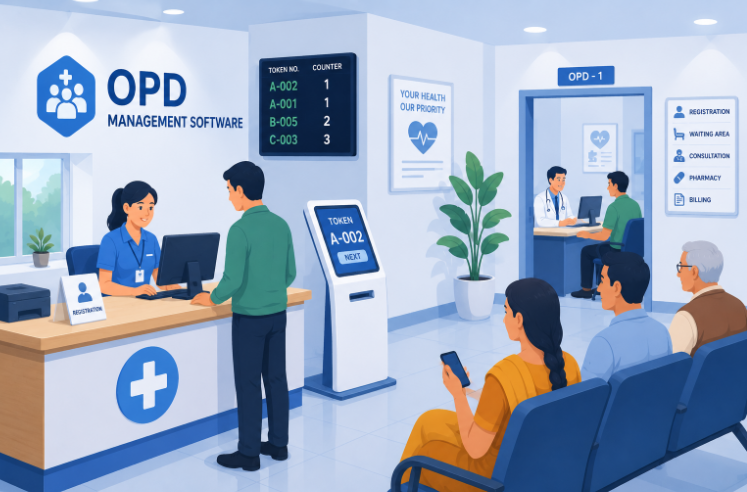
Spend a morning in a busy Indian clinic and you will see the same picture: a crowded waiting area, a register being flipped at the desk, and patients asking, “How much longer?” Most of this friction has nothing to do with how many doctors are on duty. It comes from how the flow is managed. This guide explains how OPD software works in a clinic, which features matter, what the ABDM Scan and Share numbers show, and how to choose the right one. If you run a bigger hospital, see our page on OPD management software instead.
What Is OPD Software for a Clinic?
OPD stands for Outpatient Department: the part of a clinic or hospital where patients come for consultation and go home the same day. OPD software is the program that runs this daily flow. It stores patient details, books appointments, calls patients in order, helps the doctor write and print prescriptions, makes the bill, and reminds patients about follow-up visits.
It is different from a paper register in one big way: every step is linked. The detail you enter at registration reaches the doctor’s screen, the prescription and the bill without being typed again.
Why Clinics Need It: A Typical Day, Before and After
Picture a clinic on a Monday morning with no system. Registration happens in a notebook, appointments are on a phone or a whiteboard, patients have no idea when they will be seen, and old prescriptions are hard to find. The doctor asks, “What did I give you last time?”, and the patient is not sure.
Now picture the same morning with software. Patients register in a minute, get a token, and know roughly when to come in. The doctor sees the last visit on screen. The bill is ready when the consultation ends, and a reminder goes out for the next visit. The difference is not more staff or more space. It is a workflow that does not depend on memory or paper.
One honest note: no software fixes a clinic that is truly short of doctors. What it fixes is the wasted time around the consultation, such as searching files, asking the same questions again and adding up bills by hand.
How OPD Software Works, Step by Step
- Registration. A new patient’s details are saved once. A returning patient is found in seconds by phone number or ID.
- Appointment or walk-in. Booked patients and walk-ins are placed in the day’s list, with the doctor’s availability visible to the desk.
- Queue and token. Patients get a token number, and a screen or an SMS tells them when their turn is near. They no longer crowd the desk to ask.
- Consultation. The doctor sees the patient’s history and past prescriptions, notes the findings and writes a digital prescription, often from saved templates. This also removes the problem of unclear handwriting.
- Billing. The consultation fee and any tests or procedures go into one clear bill, with cash, card or UPI recorded. See how this works in our guide to medical invoicing software.
- Follow-up. A reminder for the next visit or a pending test closes the loop. This is the step most clinics skip, and the one that keeps patients coming back for care.
- Reports. The clinic can see daily collection, patient numbers by hour and repeat visits without adding up registers.
Key Features a Clinic Should Look For
| Feature | Why it matters for a clinic |
|---|---|
| Quick patient registration | One-time entry, fast search, fewer duplicate records |
| Appointments and walk-ins | Fewer clashes and a clear day plan |
| Queue and token display | Shorter crowds at the desk and less waiting stress |
| Digital prescriptions and templates | Faster consultations and clear instructions for patients |
| Patient history | Past visits and prescriptions on screen in one click |
| Billing and receipts | Itemised bills, UPI and card payments, with payment machine support |
| Reminders | SMS or WhatsApp messages for appointments and follow-ups |
| Reports | Daily collection, footfall and repeat visits at a glance |
| Multi-doctor support | Separate schedules and queues for each doctor |
| Data safety | Backups and role-based access, so staff see only what they need |
| ABHA integration | Register patients by sharing their ABHA profile |
What the ABDM Scan and Share Numbers Show
The ABDM Scan and Share service lets a patient scan a QR code at the registration counter and share their ABHA profile, so the clinic gets their details and issues a token without a paper form. The Ayushman Bharat Digital Mission launched it in October 2022.
According to a Ministry of Health release dated 6 June 2024, the service had generated 3 crore OPD tokens and was running in over 5,435 health facilities. About 75 per cent of the tokens were for first-time users. The release also said that ABDM offers financial incentives to hospitals and technology companies for such transactions under its Digital Health Incentive Scheme. Those schemes can change, so ask your vendor what applies to your clinic today.
The point for a clinic is simple: patients are already used to scanning and sharing. OPD software that supports it can cut the time spent on registration. See how it works on our ABHA integration page, and get your patients’ ABHA created where needed.
Different Clinics, Different Needs
| Clinic type | What matters most |
|---|---|
| Single-doctor clinic | Fast registration, prescriptions, simple billing and reminders |
| Polyclinic with several doctors | Separate schedules and queues, one combined report, shared patient records |
| Specialty clinics (dental, skin, eye, physio and others) | Templates and notes that match your specialty, and follow-up tracking |
| Clinic with pharmacy or lab | Links between prescription, pharmacy billing and test orders |
Free vs Paid OPD Software for a Clinic
Free software is tempting, and for a very small clinic it can be a fair start. But free often comes with limits. Check these points before you commit:
- Limits. How many patients, doctors and records are allowed?
- Your data. Can you export all your records if you want to leave?
- Privacy. How is patient data protected, and is it ever shared or used for ads?
- Support. Who helps you when something stops working during clinic hours?
- Growth. What happens when you add a second doctor or a pharmacy?
A paid plan costs money, but it usually gives you support, backups and room to grow. Compare the total cost over a few years, not only the first price.
What Affects the Cost?
- The number of doctors and users
- The features you choose, such as billing, reminders and reports
- Cloud or on-premise setup
- Moving your old patient records
- Training and support
- Payment machines or printers, if needed
Ask for a written quote that shows what is included and what costs extra.
Keeping Patient Data Safe
A clinic holds private information: names, phone numbers, diagnoses and prescriptions. The Digital Personal Data Protection Act, 2023 sets rules for handling personal data, so ask the vendor how it protects yours. Look for role-based access, strong passwords, activity logs and regular backups. Our page on data security explains what to check.
How to Choose OPD Software for Your Clinic
Use these points when you compare any OPD software for clinic use.
- Write down your daily steps. Registration, consultation, billing and follow-up. Pick software that fits them.
- Try it yourself. Ask for a demo and run a real patient from registration to bill.
- Check ease of use. Your front-desk staff should learn it in a day or two.
- Check the prescription screen. It should be fast, with templates for common cases.
- Look at reminders and reports. They should work without extra effort.
- Ask about ABHA and ABDM. Check what is working today.
- Review data safety. Ask about backups, access control and exporting your data.
- Check support and growth. Find out how quickly the vendor responds, and whether you can add doctors or branches later.
Three mistakes to avoid: choosing only on price, skipping staff training, and not testing with your own cases. If you expect to add beds, a pharmacy or a lab, look at a full hospital management software that grows with you.
A Simple 30-Day Start Plan
- Week 1. Set up doctors, fees, services and prescription templates. Import patient records if possible.
- Week 2. Train the front desk and the doctor. Run a few practice patients.
- Week 3. Go live for registration, appointments and billing. Keep the old register as a backup.
- Week 4. Switch on reminders and check your first reports. Fix what slows you down.
Frequently Asked Questions
What is OPD software for a clinic?
It is software that handles the daily outpatient work of a clinic: patient registration, appointments, queue tokens, prescriptions, billing, reminders and reports, all in one place, instead of in registers and notebooks.
Is OPD software the same as clinic management software or EMR?
They overlap. OPD software focuses on the daily outpatient flow. An EMR is the digital patient record. Clinic management software usually combines both, along with billing and reports. Check what a product really includes rather than relying on its name.
Can a single-doctor clinic use OPD software?
Yes. A single-doctor clinic can start with registration, appointments, digital prescriptions and billing. These save time for the doctor and the one or two staff members at the desk.
Is free OPD software good enough for a clinic?
It can work for a very small clinic, but check the limits on patients, doctors and storage, whether you can export your data, how your patient data is protected, and whether you get any support. A paid system with support is usually safer as you grow.
Does OPD software work on a mobile phone?
Many cloud-based systems work in a web browser on a phone, tablet or computer. Check this in a demo, and make sure the screens are easy to use on a small display.
Does OPD software support ABHA and ABDM?
Good systems do. Ask whether patients can register by sharing their ABHA profile, for example through the Scan and Share service, and ask to see it working.
How much does OPD software for a clinic cost in India?
Prices vary from free plans to paid monthly or yearly plans. The main factors are the number of doctors and users, the features you choose, cloud or on-premise setup, data migration, training and support. Ask for a written quote that shows what is included.
How long does it take to start using OPD software?
Many clinics can start with the core steps, registration, appointments and billing, within a few days to two weeks. Plan time to enter your doctor details, price list and templates, and to train your staff.
Related reading: OPD Management Software for Hospitals · Best Hospital Management Software in India · Hospital EMR Systems · Medical Invoicing Software in India · What Is a Hospital Information System (HIS)?
Conclusion
Most of what frustrates patients in a clinic, such as long waits, repeated questions and unclear bills, comes from workflow, not staffing. The right OPD software for clinic teams in India removes the paper, shortens the queue and gives the doctor more time for patients. Start with the basics, test with your own cases, and pick something that can grow with your clinic.
Ready to Bring Your Clinic’s OPD Online With iCAN Careflow?
iCAN Careflow helps clinics and hospitals across India run registration, appointments, consultations and billing in one connected system. Explore our OPD management software, or talk to our team about your clinic.